

- Image via Wikipedia

Well as of today my 2 weeks of summer holidays are over 🙁 . It was great though having those past few weeks off. I just really enjoyed relaxing about the house and not having to get up really early in the morning to go to work.
Now though I have been given a semi good week of hours. I do get this Saturday and Sunday off work so that is great! I never get a full weekend off work and could not believe that I am getting this weekend off 😀 . Also I have a few early shifts this week, beginning at 7 in the morning. I always hate having work that early and also I like it in a way. First of all I hate the fact that when I go to sleep I know I have to be getting up really early and go to work, so I usually sit there worrying that I will not hear the alarm and end up sleeping in, so in turn that makes me lose sleep and then I usually sleep really lightly so that I will hear the alarm go off.
The reason I actually like having that really early shift is that I will be beginning it at 7 and finishing work at 12! Like who would complain of only having to work for 5 hours! So I get up really early when I usually sleep, and then I finish at noon which is usually the time I get up at in the morning, so I will have the full day to myself to enjoy 😀 .
During my holiday weeks I went away for 5 days to Edinburgh. That was a great trip, I went with all my friends and we also celebrated two of their birthdays while we were over there. That was the main reason we went anyway. We all booked into a hostel, so that made the accommodation really cheap, it was roughly £50 for the four nights that we booked in. The hostel we stayed in was called the Cowgate Hostel. It was in a really good location, everything you wanted was just a 5 minute walk from the hostel.
Another note on Edinburgh is that drink and food were very reasonable in price, drink worked out at about £2 – £3.50 in most places, but would cost more for more fancy drinks such as cocktails. Cocktails are something that I had never had before and one of the nights we were out we went to a cocktail bar, it was great, we bought them in pitchers that worked out at about £8 so even then drink was still not expensive. When comparing it to home here (Ireland) you were saving a killing 🙂 .
I also went and done a lot of the touristy things such as visiting Edinburgh Dungeons and Mary kings Close, Edinburgh Dungeons was good enough, nothing special, there is also one in London and other places but the one in Edinburgh had a lot more Scottish orientated stories. It was good fun since we went with a large group.
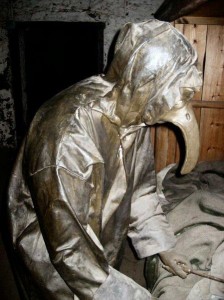 The other place we visited was Mary kings Close, this was basically a bit of a history tour of the real old Edinburgh City Underground, it was really interesting and showed the harsh living conditions of how people lived years ago and how the plague affected them. I would definitely recommend going to see both these locations if you ever go there 😀 .
On my last day in Edinburgh we decided to go to the airport early so that we would not be rushing. But when we arrived at the airport there was a bloody bomb scare! So everyone had to leave the airport and sit outside for a few hours, our flight ended up being delayed. I thought the experience was good though, the atmosphere seemed to be really good 😀
So in the end I thought my 2 weeks of holidays off work were great and I definitely am looking forward to my next week off in September 😀 .